

Introduction:
Pentaho Data Integration (PDI) stands as a cornerstone in the realm of data integration and analytics. Whether you’re a seasoned data professional or a newcomer to the field, this guide will navigate you through the crucial initial steps in leveraging Pentaho Data Integration for your ETL (Extract, Transform, Load) needs. Unveiling Pentaho Data Integration (PDI)
Introduction to PDI:
Pentaho Data Integration, often referred to as Kettle, serves as the data integration powerhouse within the Pentaho Business Analytics suite. Renowned for its user-friendly graphical interface, PDI empowers users to craft intricate ETL processes without delving into intricate coding. Supporting an extensive array of data sources, PDI emerges as a versatile solution for diverse data integration challenges.
Installation and Configuration:
Step 1: Acquiring Pentaho Data Integration
Initiate your journey by downloading the latest version of Pentaho Data Integration from the official website
Step 2: Installation Guidance
Click on “Download Now” on the official website and choose the version you want to install. Typically, we opt for the one labeled “Pentaho Data Integration (Base Install).” Navigating the Pentaho Data Integration Interface
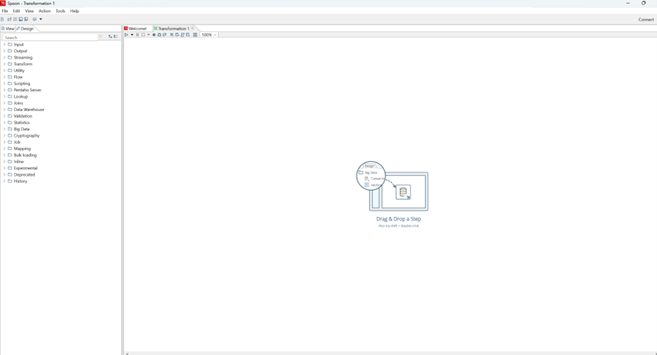
Crafting Your Inaugural ETL Job:
Step 1: Initiating a Transformation
Within Spoon, create a new transformation—a set of interconnected steps defining your ETL process. Introduce source and destination steps to depict the data flow.
Step 2: Step Configuration
Configure the source step to establish connectivity with your data source, whether it’s a database, CSV file, or another format. Simultaneously, configure the destination step to specify where your transformed data will be loaded.
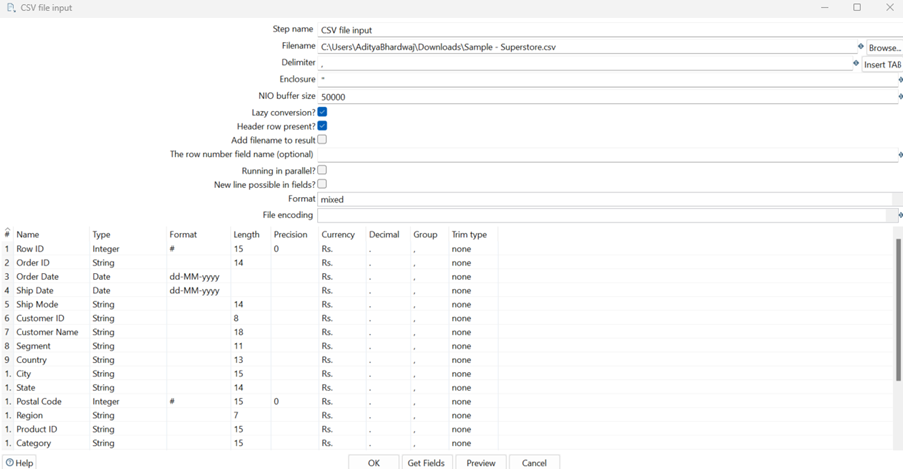
Step 3: Exploration of Transformation Steps
Delve into the diverse transformation steps PDI offers. For beginners, commence with fundamental steps such as Select Values, Filter Rows, and Add Constants to manipulate your data effectively

Step 4: Transformation Execution
Execute your transformation to witness the ETL process in action. Monitor the log window for any potential errors or warnings during the execution.
Preservation and Reusability of Transformations:
Step 1: Save Your Transformation:
Once content with your transformation, save your work. This preserves your efforts and facilitates future modifications.
Step 2: Transformation Reusability:
PDI advocates for the reuse of transformations across different jobs, fostering a modular and efficient approach to ETL design. This approach proves invaluable in saving time and effort when encountering similar data integration tasks.
Conclusion:
Embarking on your Pentaho Data Integration journey unveils a realm of possibilities in the ETL landscape. This guide has initiated you into crafting ETL processes with PDI’s intuitive graphical interface. As you grow more accustomed to the tool, explore advanced features such as job orchestration, scripting, and integration with big data technologies. Always remember, proficiency in Pentaho Data Integration is cultivated through practice. Begin with uncomplicated transformations and progress towards more intricate scenarios. The Pentaho community and documentation serve as indispensable resources for ongoing learning and troubleshooting. Happy ETL endeavors!
Please get in touch with us if our content piques your interest.